Soundcaster
A downloadable tool
🧙♂️ Soundcaster
Fix loud YouTubers. Hear quiet voices. Stop volume spikes.
🎧 What is Soundcaster?
Soundcaster is a real-time audio tool that balances sound so you can actually enjoy what you're watching or playing.
No more:
- constantly adjusting volume
- getting blasted by sudden screams
- barely hearing people in conversations
💡 Why I Made This
I built Soundcaster because I got tired of bad audio balance on YouTube.
A lot of creators — especially gaming channels — have really uneven audio:
- the main person is way too loud
- the people they’re playing with are super quiet
- random yelling spikes your volume
Channels like The Burnt Peanut are fun to watch, but the audio can be all over the place.
I was constantly adjusting volume or just dealing with it.
So I made something to fix it.
⚙️ What It Does
Soundcaster processes your audio in real-time and:
- 🔊 reduces loud spikes and shouting
- 🗣️ boosts quieter voices
- 🎚️ balances conversations
- 🎧 makes everything easier to listen to
🧠 Auto Mode (Smart + Adjustable)
Auto Mode helps, but it’s not magic on its own.
The best results come from: 👉 using Auto Mode + dialing in the controls to your preference
Auto Mode:
- adapts to loud vs quiet scenes
- smooths out spikes
- helps maintain balance
But your settings define how it behaves.
🎛️ Control It Your Way
You’re not locked into presets.
You can fine-tune:
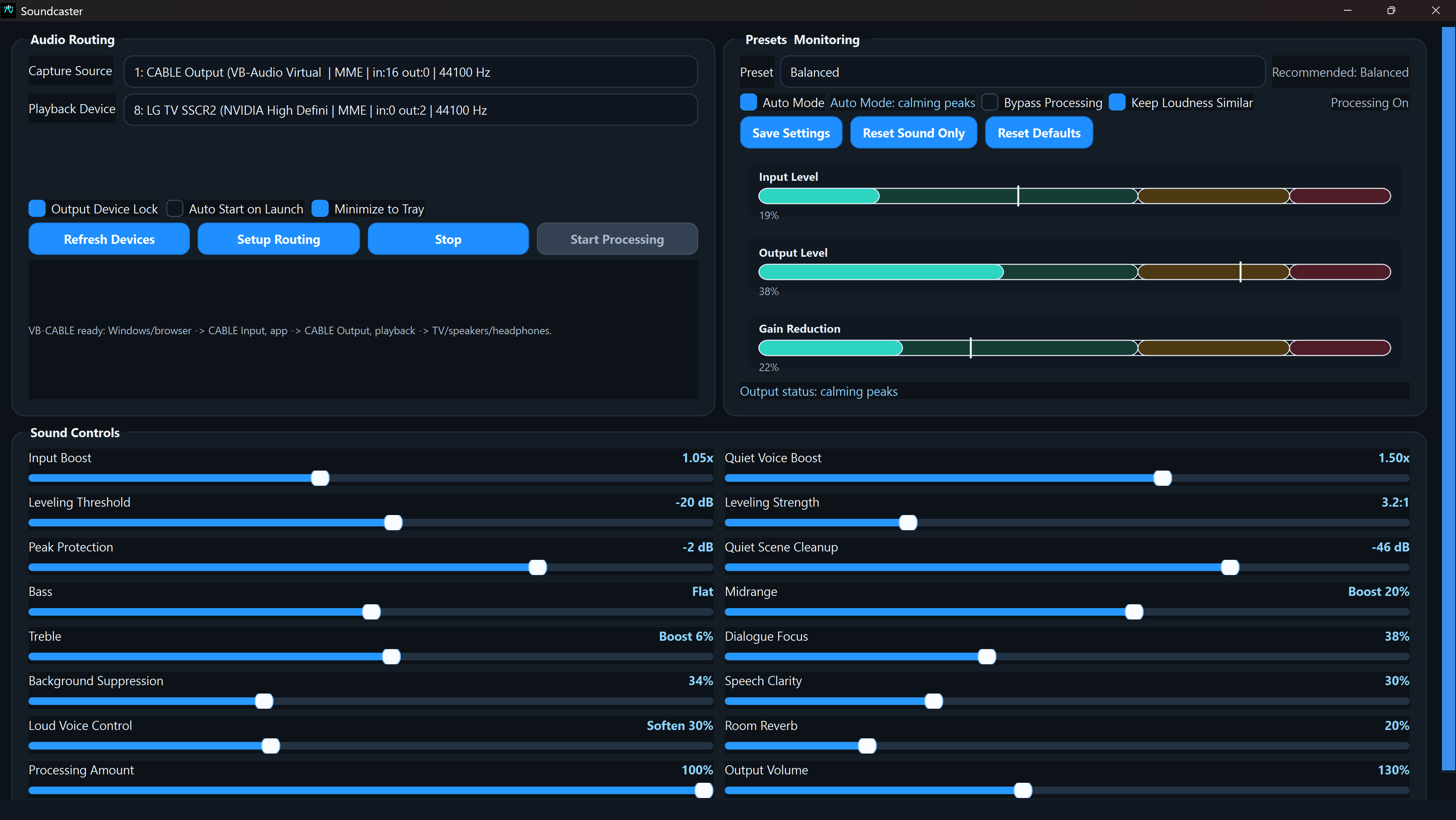
- Effect Strength (how much processing is applied)
- Voice Lift (boost quiet voices)
- Peak Protection (control loud spikes)
- Compression Strength (how aggressively audio is leveled)
👉 Once tuned, Auto Mode keeps everything stable.
🎛️ Features
- Real-time audio processing
- Smart Auto Mode (works best with your settings)
- Adjustable controls for fine-tuning
- Presets for quick setup
- Input / output monitoring
- Bypass toggle for instant comparison
- Works with YouTube, games, Discord, and more
🔊 Works With
- YouTube videos
- Twitch streams
- Games
- Voice chat (Discord, etc.)
- Any audio playing on your system
⚠️ Setup Required
Soundcaster uses a virtual audio cable to work properly.
👉 See the Setup Guide below to get started.
🎯 Goal
Take control of bad audio.
Fix it once, then let Soundcaster handle the rest.
🚀 Try It
If you’ve ever been annoyed by:
- loud YouTubers
- quiet teammates
- inconsistent audio
Soundcaster fixes it.
🎧 Tune it once. Let it handle the rest.
Download
Click download now to get access to the following files:
Leave a comment
Log in with itch.io to leave a comment.